On this page
This WordPress AI builder test asks a harder question than most demos: can the tool generate something that looks like a web page?
I wanted an answer to a harder one.
If I expect AI agents to help build and maintain WordPress sites for the next one to three years, which authoring stack gives them the safest and most useful surface to work with?
That means more than producing a hero section. The agent needs to find the correct element, change only that element, reuse the design system, move components without collateral damage, preserve revisions, render good HTML, and remain understandable after the fifth or fiftieth edit.
So I built the same landing-page brief three ways:
- Bricks 2.4 beta 3 using its new AI Abilities.
- Etch 1.6.5 using Etch Connector.
- A pure WordPress full-site-editing theme using Core blocks,
theme.json, Block MCP 2.2.1, and the official MCP Adapter 0.6.1.
The short result is that Etch won—but narrowly, and not in every category.
FSE plus Block MCP turned out to be a much more serious AI authoring option than I initially expected. Bricks remained the most flexible visual system, but its heavier frontend and beta-era AI friction prevented it from winning the overall test.
What the WordPress AI builder test measured
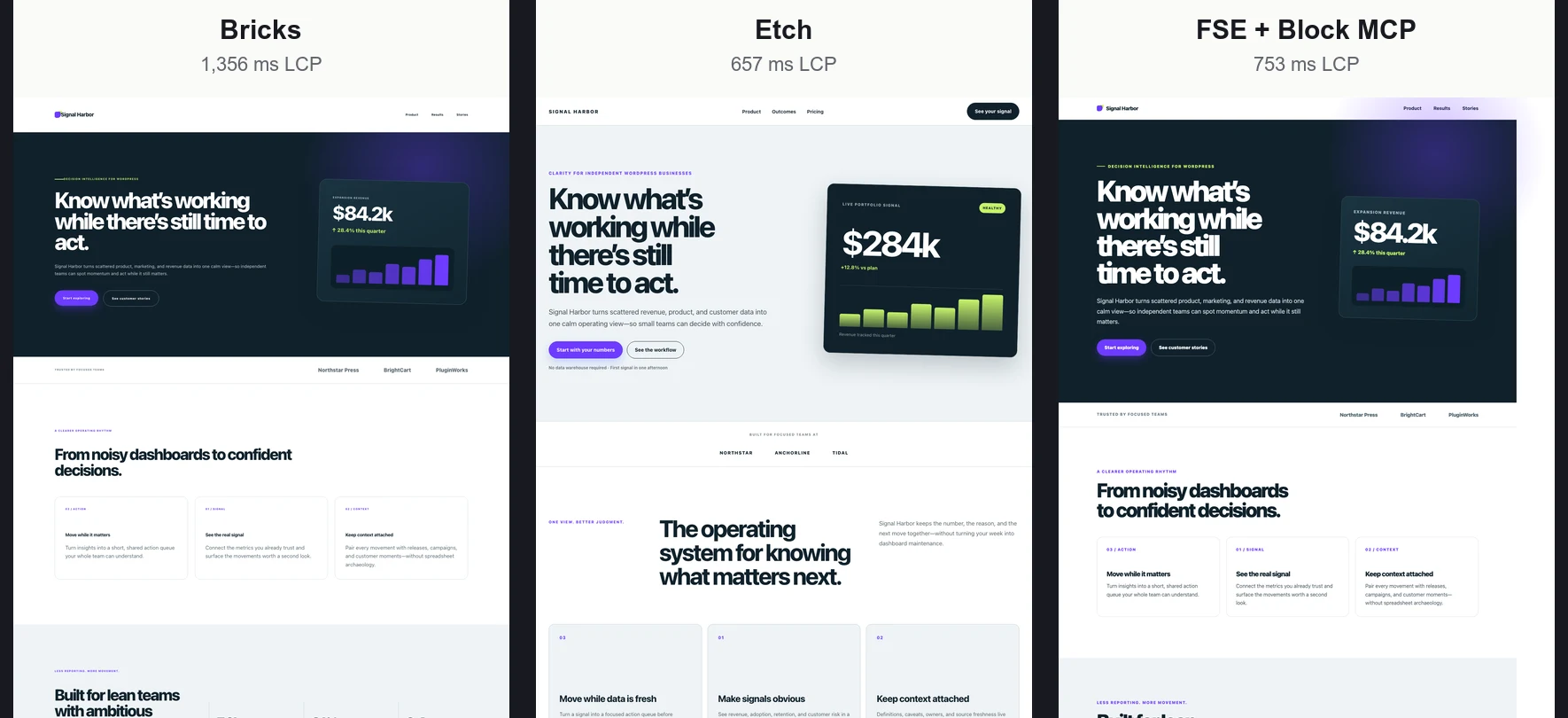
All three implementations used the same copy, section order, palette, content width, responsive targets, and visual direction. Each stack used its own native layout and typography system.
That last sentence matters: these are visually equivalent implementations, not screenshot-identical clones. Small differences in line wrapping, font metrics, and spacing remain. The performance comparison is therefore about matched content and design complexity, not a claim that every rendered pixel is identical.
I scored six dimensions:
- AI build speed and reliability.
- Atomic update handling.
- Layout and design flexibility.
- Reusable systems and customization.
- Frontend output and performance.
- SEO, semantics, and accessibility.
I also ran the same five revisions against every implementation:
- Change only the H1.
- Change the primary design token.
- Move the third benefit card into the first position.
- Add 16 pixels below the hero.
- Hide the secondary CTA below 480 pixels.
Those edits are deliberately mundane. Mundane maintenance exposes the architecture better than a one-shot generation demo.
The overall result
| Rank | Stack | Weighted score | Strongest advantage | Primary limitation |
|---|---|---|---|---|
| 1 | Etch | 8.95/10 | Direct agent-facing builder API and lean output | Manual Connector handshake and one persistence retry |
| 2 | FSE + Block MCP | 8.86/10 | Core portability and governed atomic block edits | Site-wide design remains outside the content-agent surface |
| 3 | Bricks 2.4 beta | 8.15/10 | Maximum visual flexibility and design-system depth | Heaviest frontend; preview-import ability failed in this beta |
The scores are a decision model, not natural law. A site that requires the deepest possible visual-builder ecosystem may weight Bricks differently. An organization that refuses another theme dependency may put FSE first. My weights favor a balance of AI reliability, frontend quality, reuse, and maintainability.
Etch was the cleanest agent experience
Etch Connector exposes a concise document API. The agent could set text, update a variable, move a block, change a style, and edit a stylesheet without pretending the page was one giant string.
The five atomic tests all reached the intended final state with no collateral changes. Its native page used 99 Etch element blocks, 70 style rules, six variables, and three stylesheets.
Etch also produced the lightest frontend in the repeated test: two browser requests, 25,725 bytes of decoded response bodies, and a median LCP of 657 milliseconds.
The operational caveat is real. A person must enable AI Connector in Etch settings, open the page in the builder, and click the AI control to connect that browser tab. Four individual saves also needed one final persistence retry before the already-open frontend reflected every change. The final saved output was correct, but connection and persistence deserve lifecycle testing.
FSE became competitive once Block MCP was included
The pure Core implementation stored ordinary blocks in post_content, used theme.json for global settings, and kept its templates and CSS as theme source.
Block MCP added what a naive REST or post-wide edit would be missing: stable block references, tree-level move operations, revisions, and conflict-aware saves. The H1 and card reorder both became narrow operations rather than a risky replacement of an entire serialized document.
FSE matched Etch’s 15/15 atomic result. It also stayed close on frontend performance at 753 milliseconds median LCP.
Its limitation is partly intentional. The dedicated content agent cannot rewrite site-wide design settings. Changing the palette, theme CSS, or global responsive behavior remains a theme-level operation. That is slower for an unrestricted design agent, but it is also a useful security and governance boundary.
Bricks remained the flexibility winner
Bricks exposed a deep system of elements, global classes, variables, theme styles, components, revisions, rendering, and validation. The final page used 85 native elements, 45 global classes, and six variables without relying on a Code element.
It was also the fastest raw native import once the lower-level conversion path worked: 126 milliseconds. But that number is not total build time, and the advertised higher-level preview import failed against this beta with a private-property error.
Four of the five revisions were fully atomic. Bricks had no move-element ability in this beta, so reordering one card required resubmitting the complete 85-element tree. Element IDs survived, but the operation had a much larger blast radius than the corresponding Etch or Block MCP move.
The frontend differences were larger than the Lighthouse scores
Every repeated run scored 100 for Lighthouse Performance. Every build had zero layout shift and zero blocking time.
Yet their delivery surfaces were very different:
| Metric | Etch | FSE + Block MCP | Bricks |
|---|---|---|---|
| Median LCP, five runs | 657 ms | 753 ms | 1,356 ms |
| Requests | 2 | 4 | 7 |
| Raw HTML | 22,484 B | 56,569 B | 61,202 B |
| Decoded response bodies | 25,725 B | 111,667 B | 460,633 B |
| Accessibility | 94 | 90 | 90 |
| SEO | 92 | 92 | 92 |
This is why I do not want a platform decision reduced to a green Lighthouse badge. A perfect lab score can hide a four-to-eighteen-times difference in transferred and decoded material.
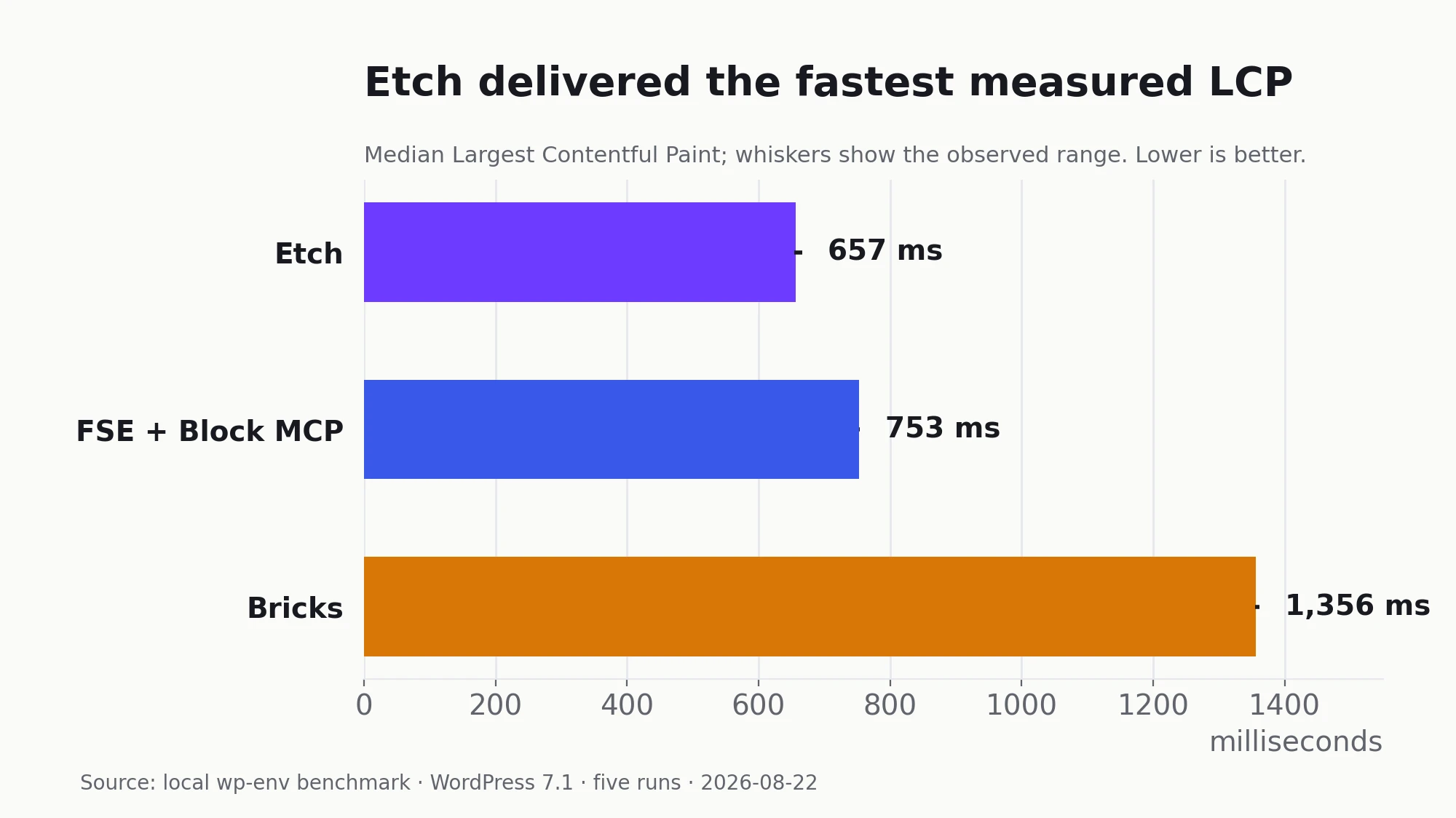
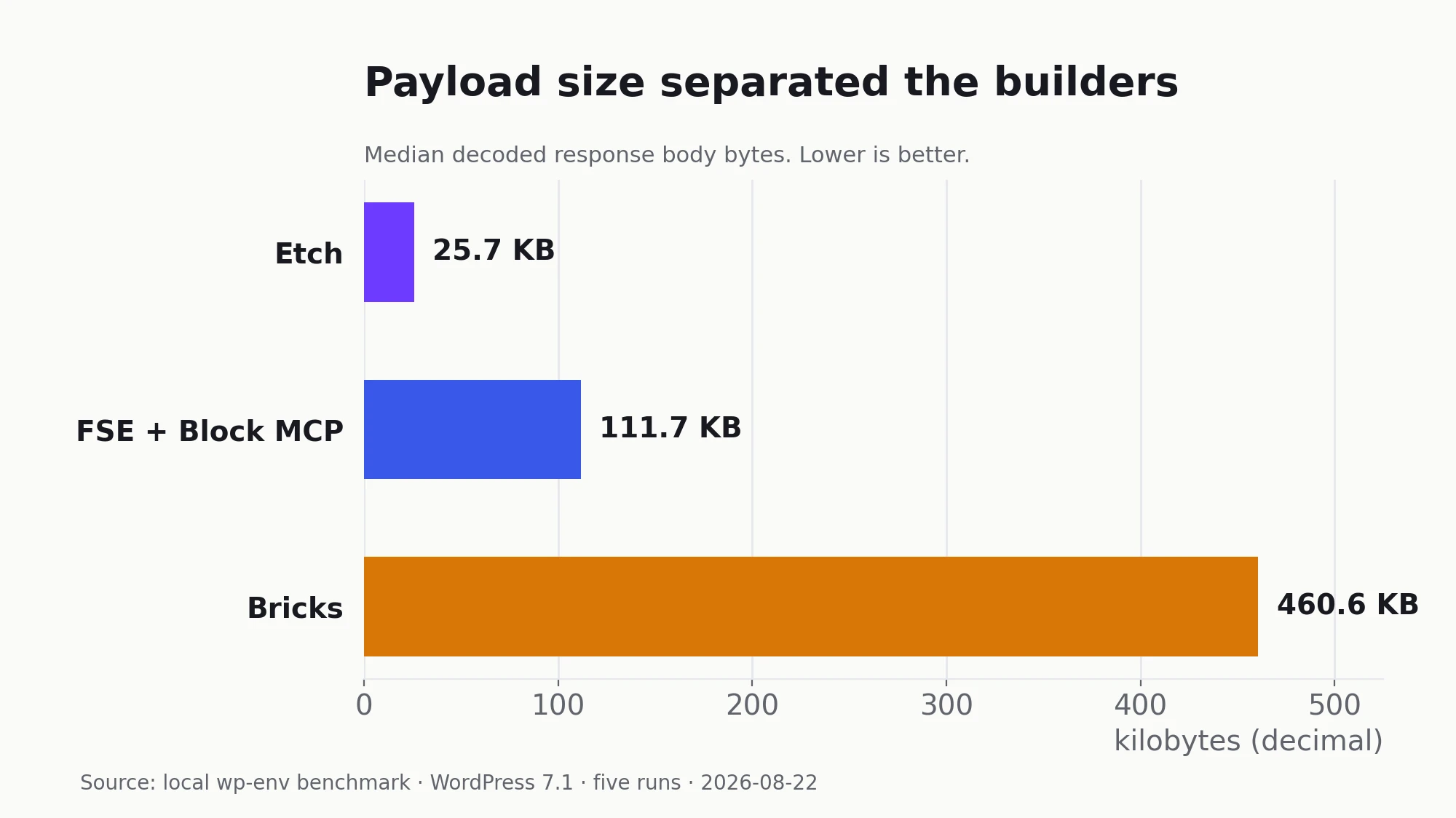
I unpack the measurement and its limitations in Bricks vs Etch vs Gutenberg Performance: Same Page, Very Different Output.
Gutenberg compatibility is not the same as builder-native editing
Both Etch and Bricks can coexist with content authored in Gutenberg, but the details matter for plugin developers.
Etch passes unsupported third-party blocks through WordPress’s renderer and represents them as placeholders in Etch. Bricks can render Gutenberg through its Post Content element, but its Gutenberg-to-Bricks conversion supports standard Core blocks—not arbitrary custom blocks.
That means a well-built dynamic plugin block should continue to render without being rewritten. It does not mean its controls and internal structure become native elements in either builder. The outer archive/single template is a separate concern: each platform still needs a builder-appropriate shell around the portable block content.
For the full compatibility matrix—including passthrough behavior, native controls, and server-rendered blocks—read how ordinary Gutenberg plugin blocks behave in the AI-operability comparison.
The missing flexibility test: loops, custom code, and interactivity
The first benchmark tested a deliberately normal marketing page. It did not test the point where a builder becomes a development environment: custom content loops, unusual semantic structures, third-party app embeds, or interaction logic.
That omission matters. A platform can be excellent at cards and hero sections while becoming awkward the moment I want to paste in a small JavaScript experiment, loop over an API response, build a custom Web Component, or make one component coordinate state with another.
| Capability | Etch | FSE + Block MCP | Bricks |
|---|---|---|---|
| Visual content loops | WP Query, JSON, terms, and users; arbitrary child markup | Core Query Loop for posts and custom post types | Posts, terms, users, API responses, and arrays |
| Advanced query escape hatch | Custom query definitions and a public loop API | Query variations, REST parameters, and PHP filters | PHP query editor, hooks, global queries, and query filters |
| One-off custom app/embed | Iframe or native HTML/CSS/JavaScript panels | Embed/Custom HTML for simple cases; a custom block or plugin for serious code | Code element plus global, page, and element-level code |
| Custom structures | Arbitrary semantic HTML and custom elements stay visible as structure | Anything can become a registered block, pattern, or template | Deeply nestable builder elements or custom code/elements |
| Interaction model | Component structure plus direct JavaScript | WordPress Interactivity API or a block’s view script | Mature visual triggers/actions plus custom JavaScript functions |
The practical winners differ by definition:
- Bricks has the broadest ready-made visual feature set. Its Query Loop supports WordPress content, APIs, and arrays; its interaction panel covers common event-driven behavior; and its Code element can execute PHP, HTML, CSS, or JavaScript. It is the fastest route when the requirement maps to an existing Bricks control.
- Etch has the cleanest custom-structure path. HTML, CSS, JavaScript, loops, and components are parts of the same authoring environment. A copied experiment can be embedded quickly, but its useful pieces can also become normal semantic elements and reusable components instead of one opaque code blob.
- FSE has the highest open-ended ceiling and the highest development cost. WordPress can run any custom block, server render callback, view script, or Interactivity API store we are willing to build. Block MCP can maintain the registered structure, but it does not turn plugin development into a visual workflow.
For something like a JSFiddle demo, all three can ultimately display it. The better test is what happens next. Can the experiment be decomposed into editable structure? Can its styles join the design system? Can an agent change one behavior without replacing the entire code payload? On that version of flexibility, Etch looks strongest, Bricks is strongest when the behavior fits its native elements and interactions, and FSE is strongest when we are willing to own a proper custom block.
The AI-operability article examines the maintainability side of this problem. This remains a capability assessment from the current product surfaces, not a timed result from the original benchmark. A follow-up should build the same filtered content loop and small interactive application in all three stacks before these capabilities affect the weighted score.
What I would choose today
For a new custom marketing or content site, Etch is now my default. It offers the best tested balance of agent ergonomics, design-system control, frontend output, and a credible exit path.
I would retain FSE plus Block MCP as the portability and governance standard. It is close enough to Etch in this benchmark that Core-native architecture remains a credible first choice whenever vendor independence or highly constrained agent permissions matter most.
I would keep Bricks where its flexibility already creates business value, but I would not make it the default for new work without a page-specific reason.
The follow-up migration and exit tests strengthened rather than overturned that result. Production telemetry and real client work remain normal acceptance checks, not reasons to postpone the platform decision.
The final stack decision explains why Etch now earns that default—and where FSE and Bricks still make more sense.
Disclosure: I may earn a commission if you purchase Etch through links in this article, at no additional cost to you.
Series: Next, read the frontend performance teardown, the AI-operability architecture comparison, the FSE-to-Etch migration experiment, and the final stack decision.