
On this page
This WordPress builder AI agent comparison starts with a simple premise: an AI button tells me almost nothing about whether a builder is good for AI agents.
The useful question is whether an agent can inspect a real document, identify one target, make one bounded change, preserve everything around it, verify the result, and roll back when necessary.
That is the standard I used when comparing Etch Connector, Bricks AI Abilities, and Gutenberg with Block MCP.
The best AI authoring surface is not the one with the most impressive prompt box. It is the one that makes the smallest correct change and leaves enough evidence for the next person—or agent—to understand it.
The five operations that reveal the architecture
I asked every stack to perform the same maintenance tasks:
- Change only the H1 copy.
- Change the primary global color token.
- Move the third benefit card into the first position.
- Add 16 pixels of space below the hero.
- Hide the secondary CTA below 480 pixels.
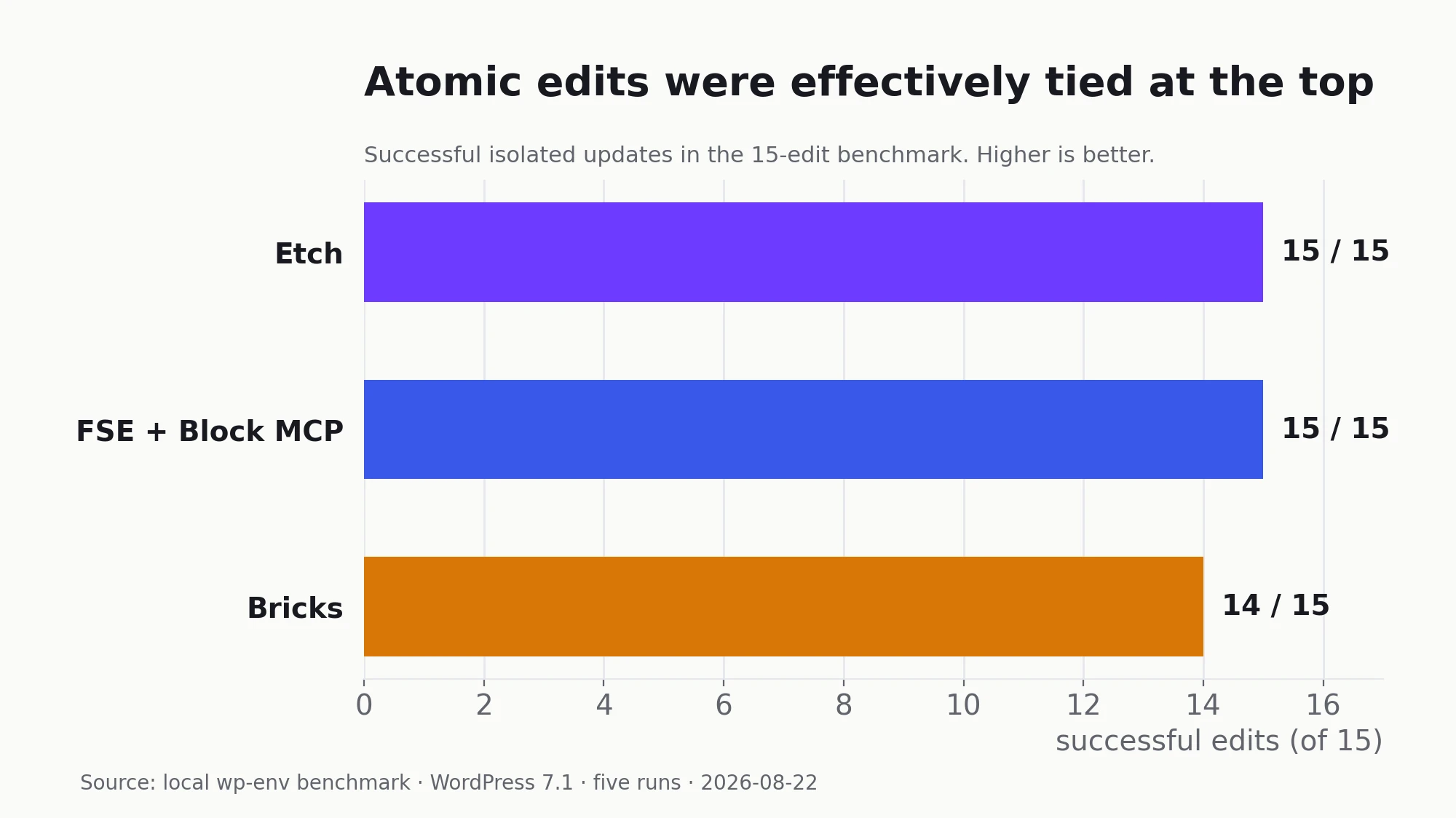
Etch and FSE plus Block MCP scored 15/15. Bricks scored 14/15 because its beta ability set had no element-move operation; the reorder required resubmitting the complete element tree.
The scores were close. The routes to those scores were not.
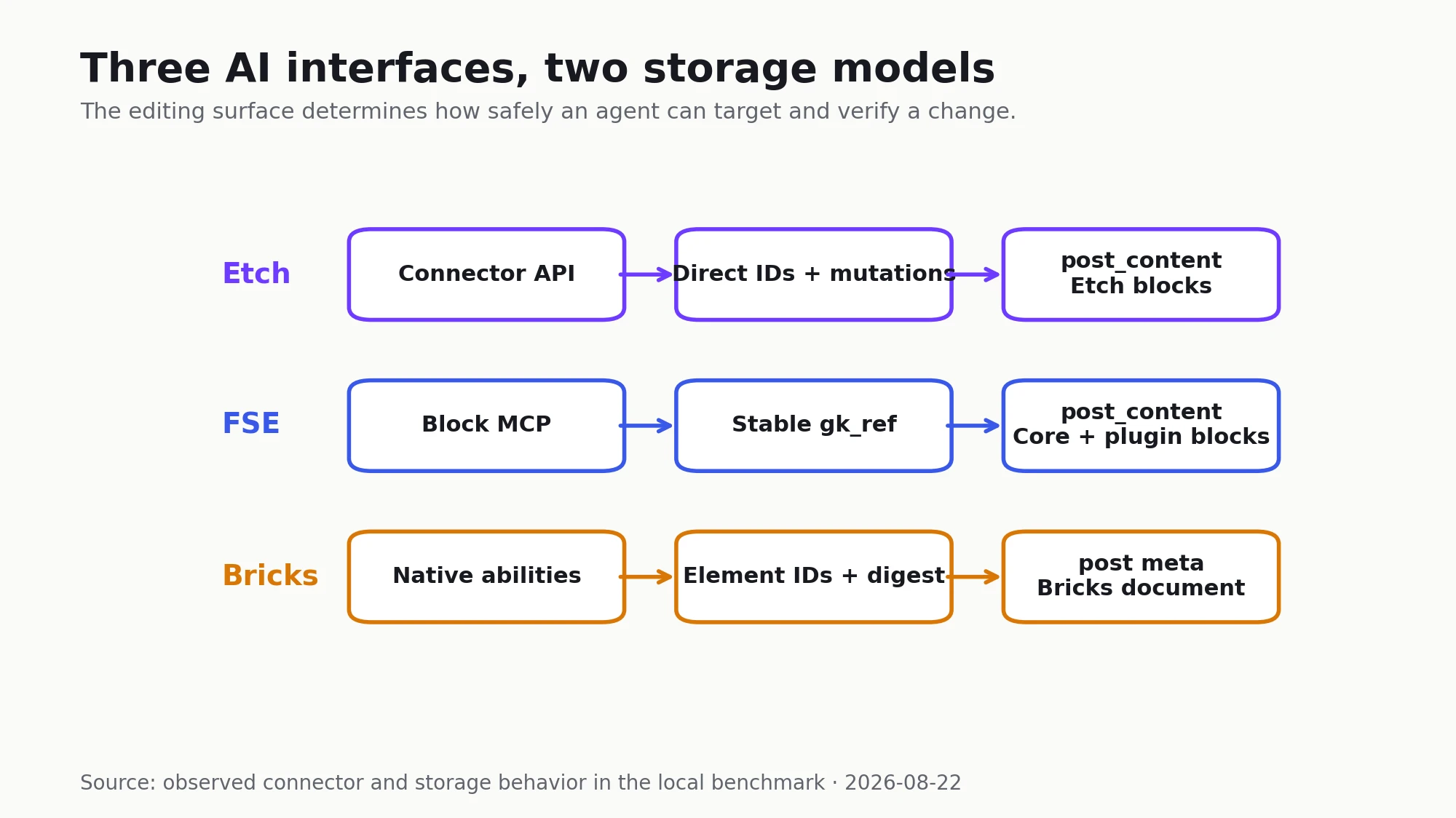
Etch: a direct builder mutation surface
Etch Connector exposes document operations that line up with the way an agent thinks about the task:
blocks.setTextblocks.movestyles.setVariablestyles.update- stylesheet updates
That made all five edits precise. The in-memory diffs showed no unrelated changes. Etch had the clearest builder-native mapping between intent and operation.
The connection model is the tradeoff. A user must enable AI Connector in Etch, open the page in the builder, and click the AI control for that tab. This is a sensible consent boundary, but it means unattended work depends on an established browser session.
The test also needed one final save retry before every previously executed edit appeared on the already-open frontend. The content ultimately persisted correctly. For production use, I would explicitly test reconnection, stale tabs, concurrent human edits, and save acknowledgments.
FSE plus Block MCP: the best governed content surface
Core Gutenberg stores the document as blocks in post_content. Block MCP adds stable references, tree operations, revisions, and concurrency-aware saves on top of that model.
The agent updated the H1 through one stable block reference and moved the third card through one tree move. Both calls returned the canonical saved block/path and created revisions. There were no collateral warnings.
This was much safer than serializing and replacing an entire post. It also makes the operation easier to audit: the saved revision describes an actual WordPress content change rather than an opaque external builder document.
The design boundary is deliberate. The content agent could not edit theme.json or arbitrary site CSS. Global palette, spacing, and responsive changes remained controlled theme-source operations.
For an unrestricted design agent that is friction. For an editorial agent account, it is exactly the boundary I would want.
Bricks: capable native abilities over a separate document
Bricks did not store the benchmark page as Gutenberg content. Its post_content was empty; the canonical 85-element document lived in _bricks_page_content_2.
Bricks’ AI layer still offered many of the right primitives: stable element IDs, revisions, document digests, targeted setting patches, global classes and variables, rendering, validation, and components.
The H1 change was a true one-element settings patch. The design-system changes were native Bricks operations. The missing move ability was the main atomicity gap in this beta.
Bricks also exposed a useful lesson about “AI import.” Its high-level preview-import ability failed with a beta defect. The lower-level ability path succeeded and produced a strong native document, but required more orchestration. An AI-facing facade is only as good as its least reliable common path.
Block MCP already works with part of Etch
Etch stores genuine Gutenberg block data. The tested page contained 99 etch/element blocks and 52 etch/text blocks in post_content.
On a draft clone, Block MCP successfully updated an Etch H1 by stable reference and moved an enclosing Etch card. Both changes rendered and produced revisions.
The missing piece was discovery. Some Etch text is stored in a block attribute while innerHTML is empty. Block MCP’s current search did not find that text even though a direct stable-reference update worked.
A small schema-aware enrichment layer could teach search which attributes contain human-facing text for registered blocks. That would improve Etch’s fallback editing surface without creating an Etch-specific document store.
I would not make that integration the basis of the platform choice. Etch should win because its builder and output are good. Block MCP compatibility is a useful architectural bonus.
Custom code is only agent-friendly when it remains structured
All three stacks can ship a small custom application. That does not make the result equally maintainable by an agent.
Bricks can execute PHP, HTML, CSS, and JavaScript through its Code element, and its visual interaction model can call custom JavaScript functions. Native Bricks elements and interactions retain useful IDs and settings. A large Code element, however, becomes one atomic blob: changing one internal behavior means editing and validating the whole payload.
Etch exposes HTML, CSS, JavaScript, loops, components, and arbitrary element tags inside the same document model. If an agent decomposes copied code into Etch elements and styles, the structure remains targetable through the Connector. If it merely pastes everything into one script or embed, Etch loses much of that advantage.
FSE makes the distinction explicit. A Custom HTML block is a convenient container, not a complete application architecture. A serious interactive feature belongs in a registered block with declared scripts or in the WordPress Interactivity API. That requires more development, but it gives Block MCP a schema and stable block boundary instead of asking it to understand an arbitrary code string.
The full comparison contains the side-by-side capability matrix. For agent testing, I would still score two custom-code paths: the fastest successful embed and the maintainable implementation. The second matters more for a platform we expect to edit for years.
What about plugin blocks?
Third-party Gutenberg blocks remain their own compatibility surface. Etch passes unsupported blocks through WordPress rendering and shows a placeholder in its builder. Bricks can render WordPress editor content through Post Content, but does not convert custom third-party blocks into Bricks elements.
The compatibility boundary
Usually yes on the frontend. Usually not as native builder modules.
Etch supports third-party Gutenberg blocks through passthrough blocks. WordPress still renders the block, while Etch shows a placeholder instead of translating its controls and structure into Etch elements. Etch documents this behavior directly.
Bricks can render Gutenberg content through its Post Content element when the source is the WordPress editor. Its Gutenberg conversion is limited to standard Core blocks, so custom third-party blocks do not become ordinary editable Bricks elements without a purpose-built integration.
Bricks 2.4 can also expose a Bricks component as a Gutenberg block. That is the opposite direction: Bricks owns the module and Gutenberg editors can insert it. It does not make an existing third-party block editable inside Bricks.
What this means for third-party dynamic blocks
A well-built server-rendered Gutenberg block should not need to be rewritten merely to display under another builder. Its PHP render callback, saved attributes, and content context remain WordPress concerns.
- Etch: unsupported third-party blocks render as passthrough blocks and appear as placeholders in Etch. Their settings remain editable in Gutenberg unless the plugin adds a native Etch mapping.
- Bricks: a Bricks template can render Gutenberg content through Post Content, but custom blocks do not become native Bricks elements. A builder-native adapter is only necessary when those controls need to appear directly in Bricks.
- FSE: registered blocks remain first-class editor content. Their surrounding archive, single, or page template can be replaced independently through the normal block-template hierarchy.
- Templates: block compatibility does not carry over a former theme’s header, footer, spacing, or design tokens. Each active theme or builder still needs an appropriate outer template shell.
The distinction is simple: frontend rendering is broadly compatible; native visual editing is not automatic.
My default product strategy would be to keep canonical functionality in portable server-rendered blocks, test those blocks through each platform’s content path, and add thin native adapters only when direct insertion or builder-side controls justify another compatibility surface.
My operating model
- Use Etch Connector for structural and design work on native Etch documents.
- Use Block MCP for narrow, revision-backed Gutenberg content operations, including supported Etch fallbacks.
- Keep global design abilities explicitly opt-in and permission-gated.
- Use Bricks’ own abilities on existing Bricks sites rather than pretending its JSON is normal Gutenberg data.
- Require every agent workflow to verify canonical storage and the rendered frontend after saving.
Disclosure: I may earn a commission if you purchase Etch through links in this article, at no additional cost to you.
This article is part of the WordPress AI Builder Test series. Read the complete comparison, see how the storage models affected frontend performance and the FSE-to-Etch migration, then read the final stack decision.