
On this page
To migrate a WordPress FSE site to Etch, the obvious objection is the installed base: can the current content and design system survive the change?
It is easy to recommend Etch for a blank site. What happens when the site is already fully built with a block theme, Core blocks, theme.json, templates, and template parts?
I cloned the completed FSE benchmark and tried it.
The result was encouraging, but more nuanced than “activate Etch and keep editing.”
Etch preserved the content perfectly. It did not preserve the design automatically, and it did not turn the old Core block tree into native Etch elements.
Activation did not rewrite the page
Before the switch, the benchmark homepage was already a substantial FSE build: 87 nested Core blocks carrying the complete page structure, copy, links, and semantic hierarchy.
I compared that complete block tree before and after activating the Etch plugin and required theme. The structure and content were unchanged.
That is the first important finding: the theme switch did not convert or corrupt the source page. I also avoided saving through Etch during this phase, so the test isolated activation from later authoring changes.
The content survived; the design did not
The page still rendered, but it was effectively unstyled. That makes sense once the responsibilities are separated.
The content lived in the database. The visual system lived in the former block theme’s stylesheet and theme.json. Activating Etch changed the active theme, so the old theme stopped supplying those assets and global settings.
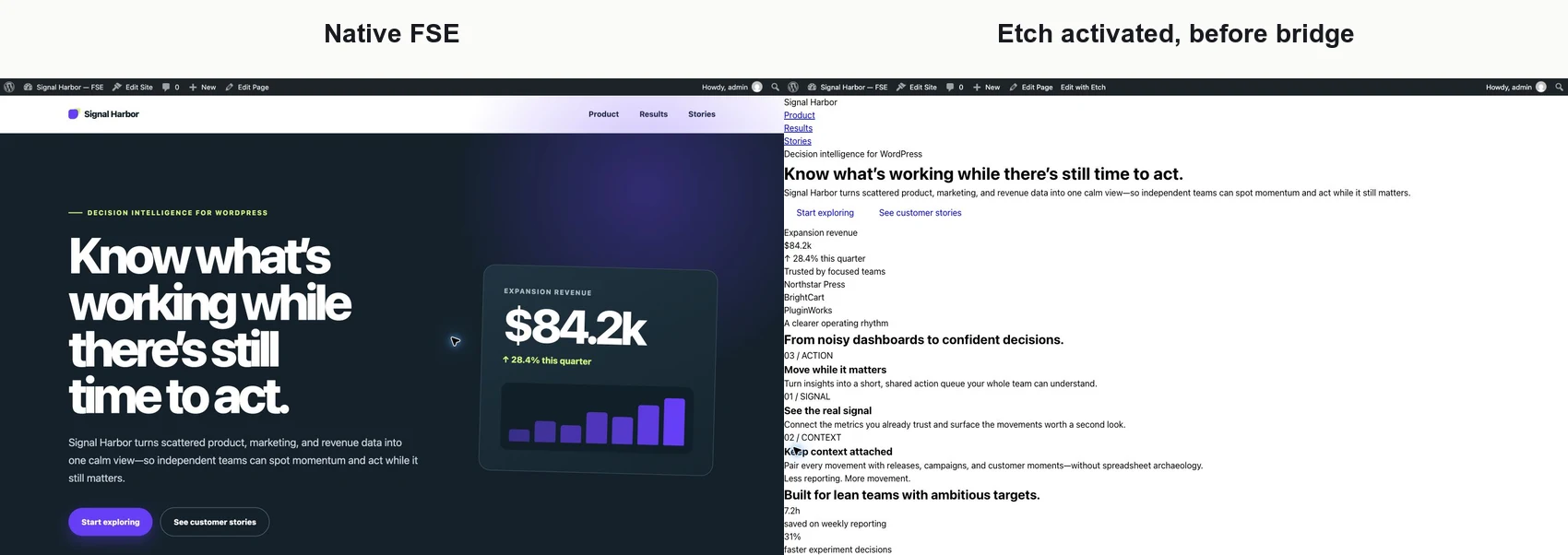
Inside Etch, the entire page appeared as one opaque core/group passthrough. The nested Core blocks still existed, but Etch did not expose each of them as a native visual element.
That is the central migration distinction:
- Presentation can be preserved temporarily.
- Native Etch editability requires rebuilding the structure.
Porting the old design restored near-parity
I added a small compatibility plugin that did three things:
- Enqueued the inactive FSE theme’s existing stylesheet.
- Recreated the relevant
theme.jsoncolor and font custom properties. - Recreated the global body, heading, and link defaults previously emitted by the theme.
With Etch still active, the legacy page returned to near-pixel parity with the native FSE version.
The controlled viewport comparison found approximately 0.71% differing pixels, with normalized ImageMagick RMSE of 0.0395. A one-pixel viewport-height difference and antialiasing account for part of the delta.
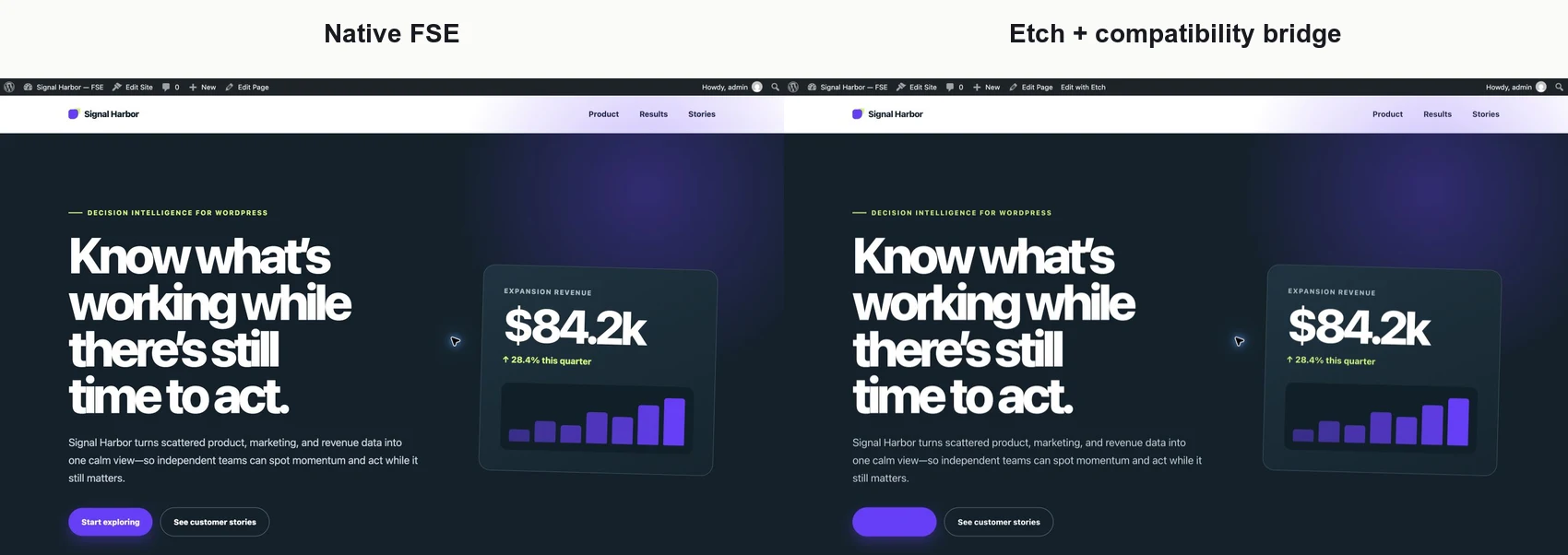
This validates the idea I think of as “Etching away” at a site: preserve the current frontend first, then replace the system in slices.
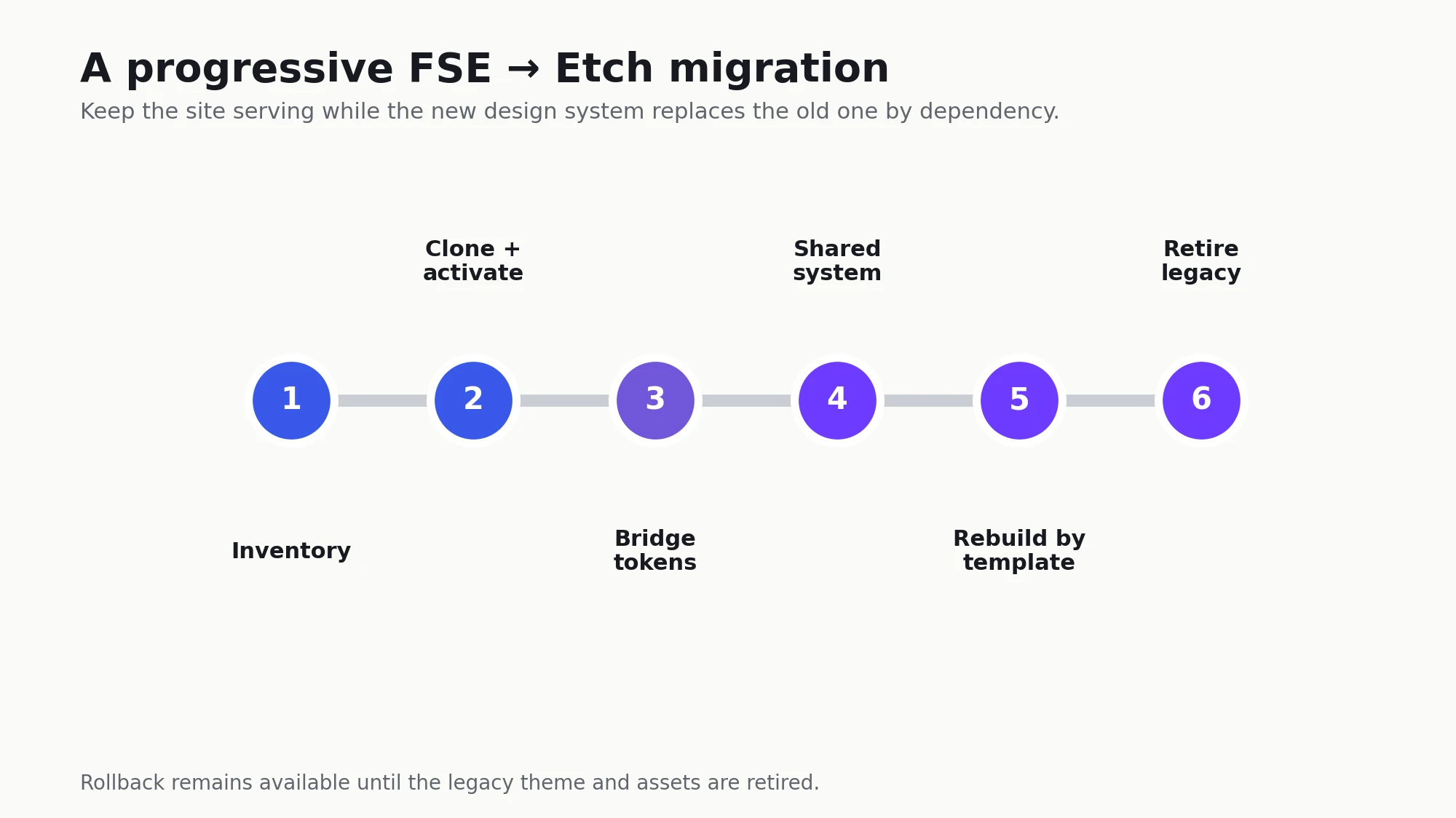
The practical migration sequence
1. Inventory the real theme surface
The benchmark page kept its header and footer inside page content, which made the compatibility layer unusually small. A production inventory should include:
- Top-level templates and template parts.
- Navigation behavior.
- Global Styles and custom properties.
- Local and hosted fonts.
- Theme scripts and hooks.
- Query loops and dynamic data.
- Plugin-specific theme integrations.
- Forms, SEO, caching, and accessibility behavior.
2. Activate Etch only in a clone
Confirm that block structure, copy, links, post counts, revisions, taxonomies, and critical metadata remain intact. Establish an explicit rollback before changing any native documents.
3. Add a temporary legacy-design bridge
Load only the assets needed to preserve existing routes. Avoid copying the entire former theme into permanent compatibility code without an exit inventory.
4. Rebuild the shared system first
Start with the Etch header, footer, global variables, typography, containers, buttons, cards, and other repeated components. New pages can then use the native system without duplicating old decisions.
5. Replace pages and templates incrementally
Move high-value or high-change routes first. Keep untouched Core pages editable in Gutenberg and render them through the transitional template.
6. Retire legacy assets by dependency
Remove an old rule or token only after the final route that consumes it has been rebuilt and accepted. The migration is complete when no template, page, or plugin surface depends on the bridge.
Plugin blocks have a better migration story than page layouts
Well-built dynamic blocks remain registered by their plugin regardless of the active theme. Etch documents unsupported third-party blocks as passthroughs: they render through WordPress but appear as placeholders in Etch.
That means a server-rendered third-party block should not need to be rewritten merely to display. Its settings remain editable in Gutenberg unless the plugin supplies a native Etch mapping.
The outer template is different. Etch Theme is a block theme, so plugin-registered block templates remain part of WordPress’s template system. A polished site should still provide Etch-owned archive and single shells so the header, footer, containers, and design tokens belong to the active system. Theme-owned header and footer parts do not follow the site when their former theme is deactivated.
The AI-operability comparison has the full Etch, Bricks, and FSE compatibility matrix. For migration, the practical rule is simpler: preserve the plugin block and rebuild only its surrounding site shell unless native builder controls are required.
Performance improves as the old system leaves
A bridged page still loads legacy CSS and renders legacy Core structures. It should therefore be expected to perform more like the former FSE implementation than a clean Etch page.
The benchmark’s 657-millisecond Etch result belongs to a native Etch build. The compatibility layer buys continuity, not instant optimization. The full benefit arrives as native templates and pages replace the old structures and the bridge is retired.
Rollback worked
Reactivating the original FSE theme restored the original design immediately, with the original block structure and content still intact.
That does not eliminate migration risk, but it gives the project a much safer starting posture: preserve canonical content, isolate design compatibility, rebuild deliberately, and retain a known return path until acceptance tests pass.
I also tested the exit path in reverse. A small converter mapped the native Etch page into 99 ordinary Core blocks—Groups, Headings, Paragraphs, and a Quote—while preserving all 52 text values, all 11 links, every heading level, semantic wrappers, and CSS classes. With Etch disabled and Twenty Twenty-Five active, the converted page still rendered as a usable version of the design.
That is a credible minimum viable bridge, not a one-click migration guarantee. The active FSE theme supplies its own outer template, and complex components, dynamic loops, interactions, and exact visual parity still need purpose-built conversion. The important change is that leaving Etch is no longer merely “the data still exists”; a practical route back to editable Core blocks is feasible.
So, can an FSE site bolt on Etch?
Yes—as a reversible hybrid transition. Not as an automatic visual conversion.
Disclosure: I may earn a commission if you purchase Etch through links in this article, at no additional cost to you.
This article is part of the WordPress AI Builder Test series. Read the complete comparison, the AI-operability analysis, and the final stack decision for the wider recommendation.